A Safer Arch Linux Update Workflow
Over the past few years, I’ve noticed that Arch Linux has become one of the most talked-about Linux distributions.
Many Linux enthusiasts recommend it for its simplicity, rolling-release model, and excellent documentation.
Along with that recommendation usually comes a warning:
WARNING
Before updating your system, make sure you have a recent Timeshift snapshot or another reliable backup.
When I first started using Arch, that warning made updates feel much riskier than they actually are.
After using Arch for a while, I realized something interesting.
Most system updates complete without any problems.
Every so often, however, an upgrade requires a manual step before or after installation. These situations are usually announced through the Arch News.
The difficult part isn’t reading the announcement.
The difficult part is determining whether it actually applies to your system.
That realization led me to rethink how I update my system.
The workflow below is the one I now follow whenever I update Arch Linux. It gives me a recovery plan if something goes wrong and a structured way to handle updates that require manual intervention.
The Goal
I wanted a workflow that provides:
- a recovery plan if something goes wrong
- a structured way to review Arch News
- a repeatable process instead of relying on memory
My workflow
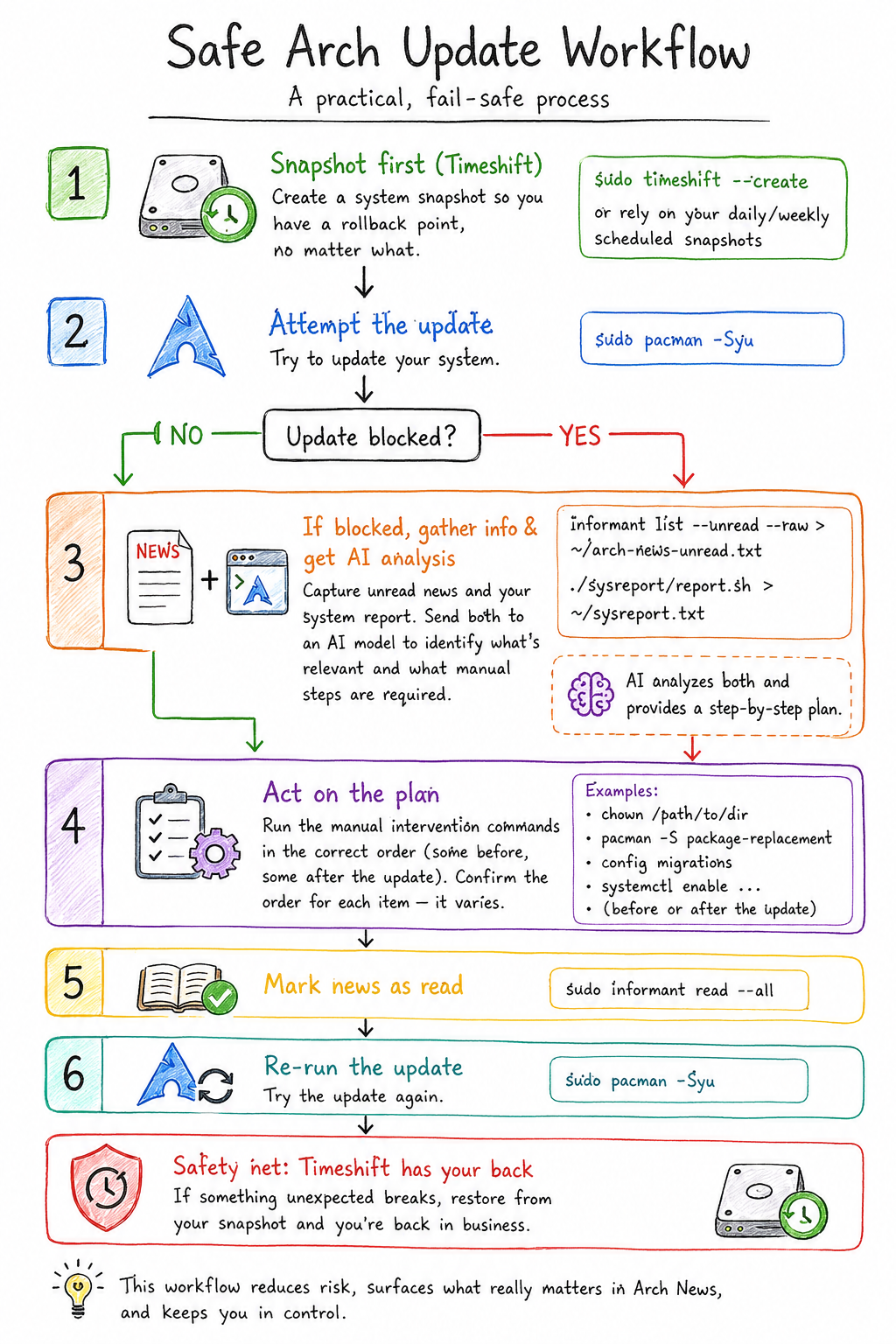
1. Create a Timeshift snapshot
Before touching the system, I ensure I have a recent Timeshift snapshot.
That snapshot becomes my recovery point.
If something unexpected happens during the update, I can always restore my filesystem.
2. Attempt the update
sudo pacman -Syu
If everything updates successfully, great.
Most of the time, that’s exactly what happens.
3. If the update is blocked
Rather than blindly following instructions from random forum posts, I collect two pieces of information:
unread Arch News a structured report describing my system
Those two documents contain almost everything needed to determine whether the announcement applies to my machine.
4. Review the information
Sometimes I review the information myself.
Sometimes I ask another experienced Arch user.
Sometimes I ask an AI assistant to explain:
whether the announcement applies which commands should be run whether they happen before or after the update why those steps are necessary
The important part is that the original Arch News remains the source of truth.
5. Perform the required manual steps
If manual intervention is required, I perform those steps.
Examples include:
- package replacements
- ownership fixes
- configuration migrations
- service changes
6. Mark the news as read
sudo informant read --all
7. Update again
sudo pacman -Syu
At this point the update usually completes normally.
Why Timeshift isn’t enough
One realization I had while developing this workflow is that Timeshift and system reports solve different problems.
Timeshift answers:
Can I recover?
A system report answers:
What changed?
Those are complementary.
One protects the filesystem.
The other helps explain the system.
I now use both.
Why I built arch_sysreport
While following this workflow I noticed I was collecting the same information every time:
- kernel
- bootloader
- filesystem
- graphics driver
- installed packages
- enabled services
Eventually I automated that process.
The result was arch-sysreport, a small utility that collects the system information I often need when reviewing Arch News or asking for help.
It doesn’t analyze anything or make decisions for you.
It simply gathers the information that’s usually needed to understand whether an announcement applies to your system.
Discussion